
There are two kinds of "money app" people.
Some track every expense. They want categories, budgets, and weekly reviews. Others want something simpler: one number that tells them whether they're moving in the right direction.
That number is your net worth.
And the most common way people use Koody for it is wonderfully low maintenance: they add all their banks and accounts once, then come back once a month to update balances. No daily logging. No constant maintenance. Just a quick check-in that keeps them honest.
Net Worth Calculator Vs Net Worth Tracker
A net worth calculator is usually a one-time thing. You fill out a form, get a number, and move on.
A net worth tracker is what you use when you want to see the story over time. It remembers your accounts, keeps everything organized, and makes it easy to update balances whenever you choose.
If you like the idea of a personal net worth calculator, but you want it to be something you can actually keep using month after month, you're looking for a net worth tracker app.
Your Net Worth At A Glance
Here's the core workflow: Koody's Banks screen acts like your net worth dashboard. Each bank rolls up the accounts underneath it, and at the top, you can see your total net worth across everything you've added.
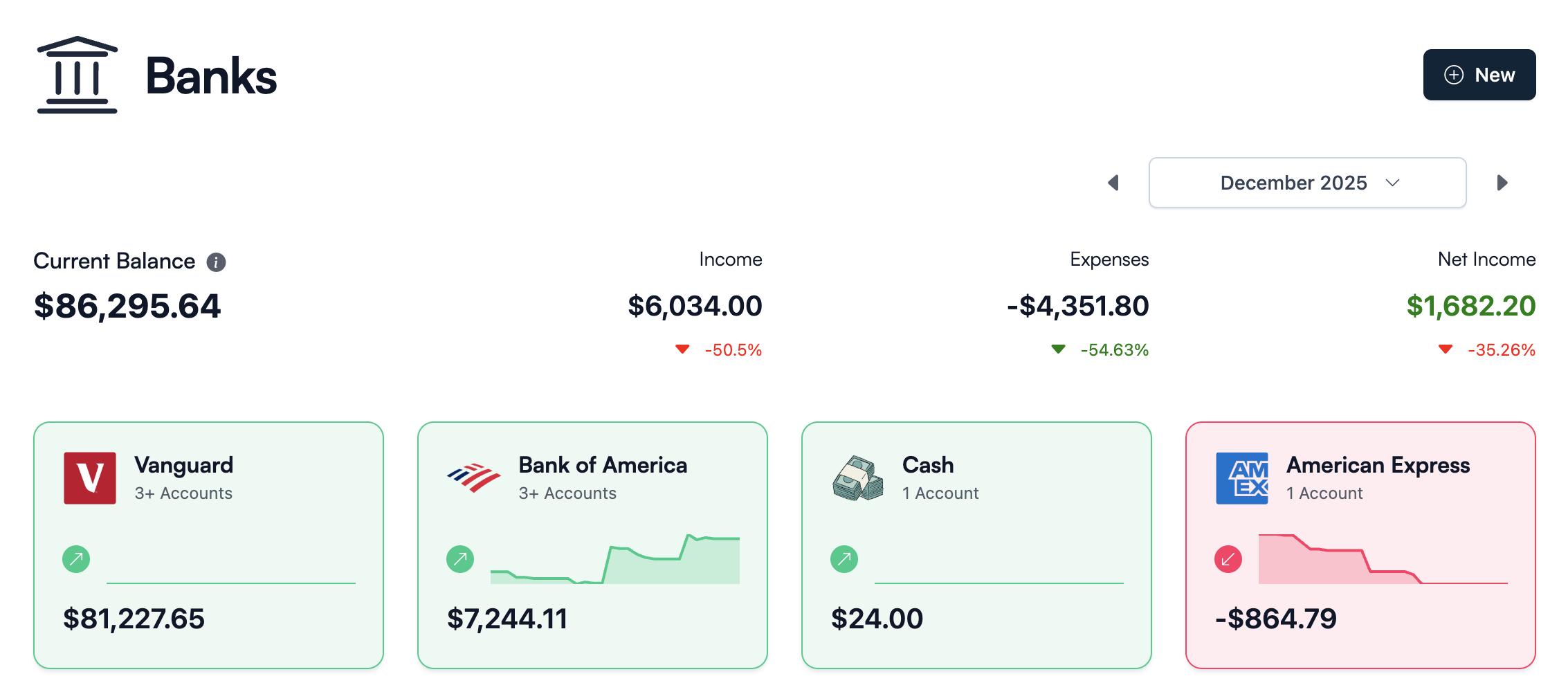
The best part is that this doesn't require you to track every purchase. If you're someone who only updates balances, the Banks screen still stays useful. It becomes your personal net worth calculator that doesn't forget your setup.
The Drill-Down View
Tap into any bank, and you land on the Bank Accounts screen. This is the "why the number makes sense" view: checking, savings, credit cards, investments, loans—whatever matters to your real financial life.
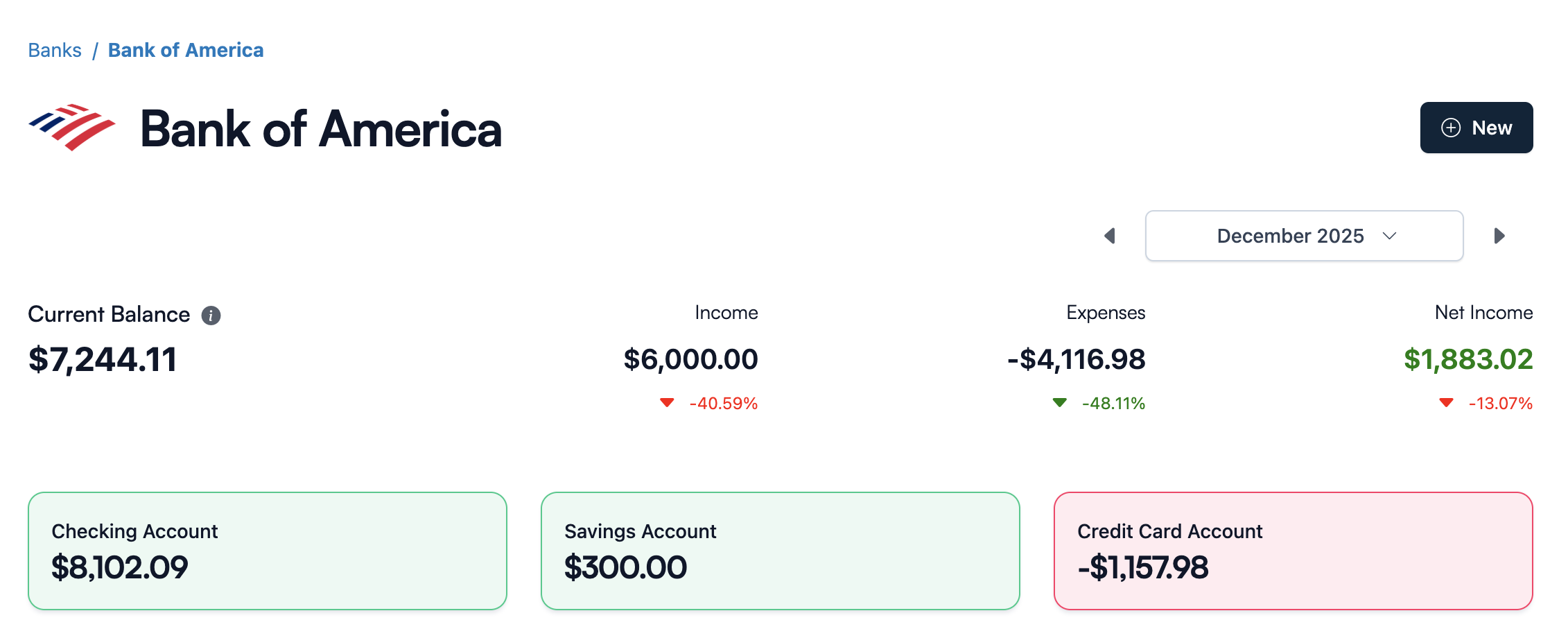
For many people, this is the sweet spot: the app holds the structure, and you only update the numbers. It's basically the spreadsheet approach, but cleaner, faster, and easier to maintain across devices.
A Simple Monthly Net Worth Routine
If you want net worth tracking to actually stick, don't overcomplicate it. Pick one day per month—many people do the first weekend of the month or the day after payday—and make it your "net worth day."
Open Koody, start at the Banks screen, and update balances on the Bank Accounts screen as you go. Five to ten minutes later, you have a fresh net worth number and a clean snapshot of where your money lives.
Over time, you'll notice something important: your net worth trend will matter more than any single month's number. That's the difference between "tracking money" and actually seeing progress.
Manual-First Net Worth Tracking (No Bank Linking)
A lot of net worth tools assume you'll connect everything to a bank sync provider. That's convenient, until it isn't: unsupported accounts, broken connections, or simply not wanting to give an app permanent access to your financial life.
Koody is manual-first. You can use it as a net worth tracker without linking a bank account at all. Add accounts manually, update balances when you want, and keep the full picture in one place.
Using Koody AI For Net Worth Clarity
If you're tracking net worth monthly, the next question is usually "what changed?" Koody AI can help you interpret your numbers without turning it into a spreadsheet exercise.
You can ask things like: what moved the most since last month, which accounts are growing, and whether your debts are shrinking in the direction you expect.
FAQs: Net Worth Calculators And Trackers
1. What Is A Net Worth Calculator?
A net worth calculator helps you compute one number: assets minus liabilities. It's useful as a snapshot, but most people get more value from tracking that number over time.
2. What Is The Difference Between A Net Worth Calculator And A Net Worth Tracker?
A calculator is typically one-and-done. A net worth tracker remembers your accounts and makes it easy to update balances on a schedule (monthly or quarterly) so you can see progress over time.
3. How Often Should I Calculate My Net Worth?
Monthly works well if you like a steady check-in without obsessing over daily fluctuations. Quarterly works well if you prefer a slower, bigger-picture view. The right cadence is the one you'll actually keep doing.
4. Can I Use Koody As A Net Worth Calculator App?
Yes. If you add your banks and accounts, Koody effectively becomes a personal net worth calculator that updates instantly as you change balances—without you doing the math each time.
5. Does Koody Work As A Net Worth Tracker Without Linking Bank Accounts?
Yes. Many users prefer manual updates. You can add accounts, set balances, and update them whenever you want—no bank connection required.
6. What's The Best Net Worth Tracker For Couples Or Families?
The best setup is the one that matches how you handle money. Some households track everything together, while others track only the accounts and debts they want in the same snapshot. Koody works for both, because you decide which accounts are included in each view.
7. What If I Have Accounts In Multiple Currencies?
You can still track your net worth across accounts in different currencies. The important thing is consistency and a clear snapshot over time, especially if you're doing monthly updates.
8. Is It Better To Track Net Worth In A Spreadsheet Or An App?
Spreadsheets are flexible, but they're easy to abandon. A net worth tracker app keeps your structure organized, works across devices, and turns the monthly update into a quick habit instead of a project.
9. What Should My Net Worth Be At My Age?
Benchmarks can be useful, but they vary widely by location, income, education debt, and family situation. For most people, the more helpful question is: Is your net worth trend improving over time in a way that matches your goals?
10. Is This A Good Net Worth Tracker For High Net Worth Individuals?
It can be, especially if you want a clean, manual-friendly way to track balances across many institutions without relying on constant bank syncing. The key is setting up the structure once, then keeping a consistent monthly update habit.
11. Can I Use This As A Net Worth Tracker If I Live Internationally Or I'm An Expat?
Yes. Manual balance updates work well when you have accounts in different countries or with institutions that aren't supported by sync providers. Add what matters, update monthly, and keep your full picture in one place.
Want a calmer way to check in on your net worth each month? Create an account and set up your banks and accounts in a few minutes.